
WHERE vs. HAVING: SQL Without the Headache (Explained with Halloween Candy 🍬)
Imagine you just dumped your massive Halloween candy haul onto the living room floor. You’ve got chocolate bars, gummy worms, lollipops, and—ugh—raisins.
If you want to make sense of that mountain of sugar, you have to organize it. Believe it or not, databases do the exact same thing every day.
Let’s clear up the eternal SQL confusion between WHERE, GROUP BY, and HAVING using that exact candy pile. No boring textbook definitions, I promise.
Step 1: What even is Grouping? (GROUP BY)
Before we filter anything, we have to sort our mess. Grouping is literally just taking your giant pile of random candy and organizing it into neat little categories.
Instead of staring at 500 individual pieces of candy one by one, you make piles:
The Chocolate pile
The Gummy pile
The Lollipop pile
In SQL, GROUP BY does this sorting for you. It looks at a column (like candy_type) and squashes all identical values into a single team so you can run math on them.
SELECT candy_type, COUNT(*)
FROM candy_stash
GROUP BY candy_type;
Boom! SQL just counted how many pieces you have in every single category.
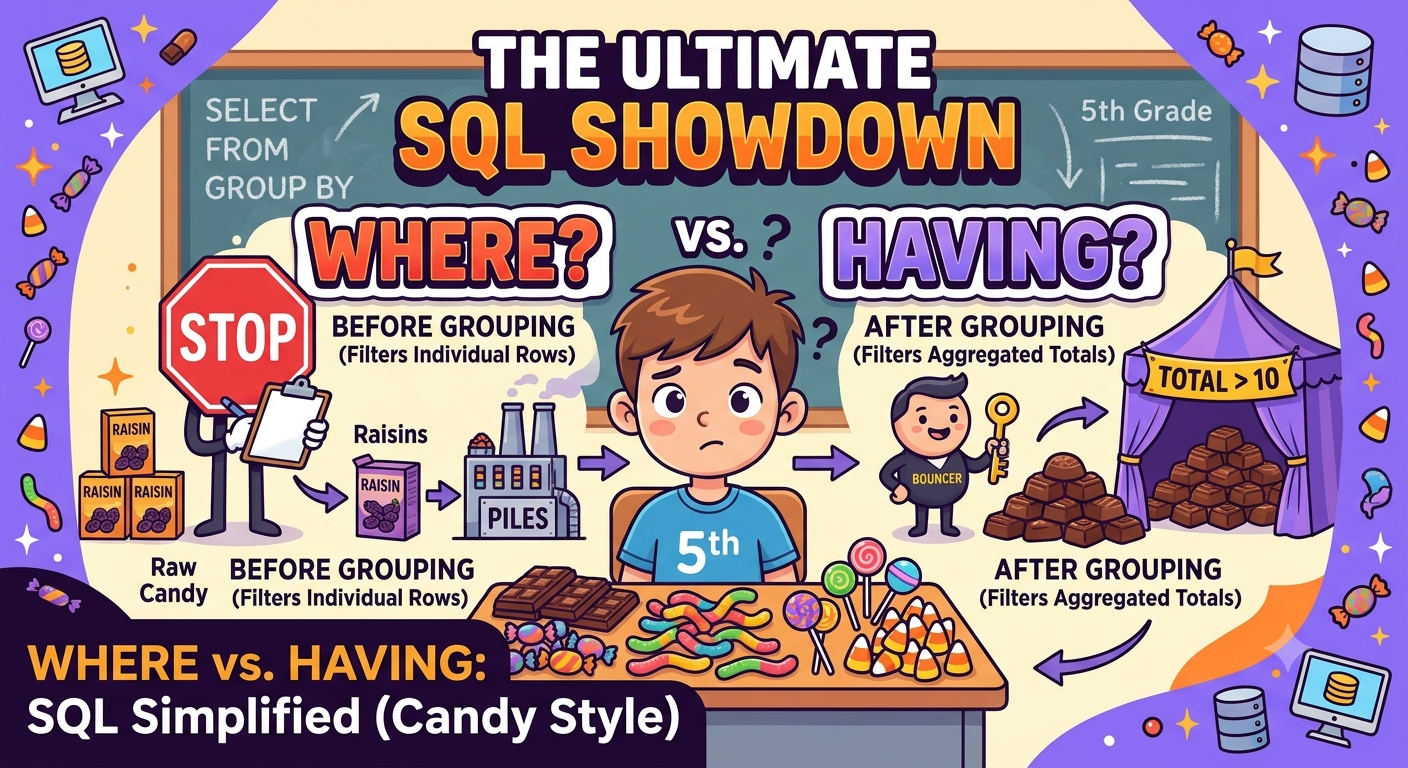
Step 2: The Door Bouncer (WHERE)
Now, imagine your mom walks into the room before you even start sorting your candy into piles, looks at the floor, and says:
"Throw away all the raisins right now. I don't even want to see them in the room."
That is basically what WHERE does.
When it happens: First thing. Before any grouping or counting even starts.
What it looks at: Individual rows (single items, one by one).
The catch: It cannot use aggregate functions like SUM() or COUNT(). Why? Because the data hasn't been grouped or counted yet! It has no idea what the totals are; it's just looking at a single row at a time.
-- Throw away bad individual candy before we even make our piles
SELECT candy_type, candy_weight
FROM candy_stash
WHERE candy_name != 'Raisin'
GROUP BY candy_type;
Step 3: The VIP Club Bouncer (HAVING).
You’ve sorted your candy into nice piles (GROUP BY), and you've counted them (COUNT(), SUM()). Now you have your totals sitting in front of you:
Chocolates: 25 pieces
Gummies: 15 pieces
Lollipops: 2 pieces
Now you want to decide which piles are actually worthy of being kept in your secret stash. You look at the totals and say:
"I only want to keep the candy piles where the total count is greater than 10."
This is where HAVING walks in.
When it happens: Last. After the grouping and counting are already done.
What it looks at: The final summarized groups/piles.
The catch: It loves aggregate functions (SUM, COUNT, AVG). It’s built specifically to filter the results after the math has been done.
-- Show me only the candy piles where the total count is greater than 10
SELECT candy_type, COUNT(*) AS total_pieces
FROM candy_stash
GROUP BY candy_type
HAVING COUNT(*) > 10;
The Golden Rule: The Order of Execution 🏆
SQL is super strict about order. If it tries to check HAVING before GROUP BY, it gets totally confused—kind of like trying to count your piles before you've actually built them.
Here is the exact order SQL reads your code behind the scenes:
FROM — Grab the raw data (the giant candy pile on the floor).
WHERE — Filter out individual junk rows (throw out the raisins).
GROUP BY — Sort the remaining items into categories (make your piles).
HAVING — Filter the categories based on totals (keep only the big piles).
SELECT — Show you the final results!
Quick Cheat Sheet to Save Your Life
Feature | WHERE | HAVING |
Vibe | The Pre-Game Bouncer | The After-Party VIP Guard |
When it runs | Before grouping | After grouping |
What it looks at | Individual rows (one by one) | Summarized groups (totals/averages) |
Can use | ❌ Nope (too early!) | ✅ Yes! (built for it) |
Next time you're writing a query and freezing up over whether to use WHERE or HAVING, just ask yourself: Am I throwing away individual items before making piles, or am I judging the piles after they are made?
About the author
- ata Analyst | SQL, Python, Power BI | Writing about projects and what I learn
Comments
Join the discussionNo comments yet. Be the first to comment.